
A subscription allows you to pay for parking on regular intervals instead of daily. This saves you time and money, and it gives you the convenience of pulling in and parking your vehicle without the worry of paying for parking upon arrival.
Note
Not all Premium Parking locations offer parking subscriptions.
Some Premium Parking locations may have a waiting list to sign up for a parking subscription as space is limited. Please fill out the waiting list form on the parking location page to be notified when parking subscriptions are available.
How do I purchase a parking subscription?
You may purchase a parking subscription on premiumparking.com or on the Premium Parking App.
Website
- Open premiumparking.com
- Search for the location or address you want to park at.
- Click Sign Up for a Subscription
- Select the type of subscription you would like to purchase such as Non-Reserved (24/7 access)
- Click View Rate
- Confirm the total of the subscription and the Start date of your subscription.
- Click Park Here
- Enter your license plate number and payment details.
- Confirm your payment amount and click Pay.
- You will receive confirmation on screen and a receipt by email.
Premium Parking App
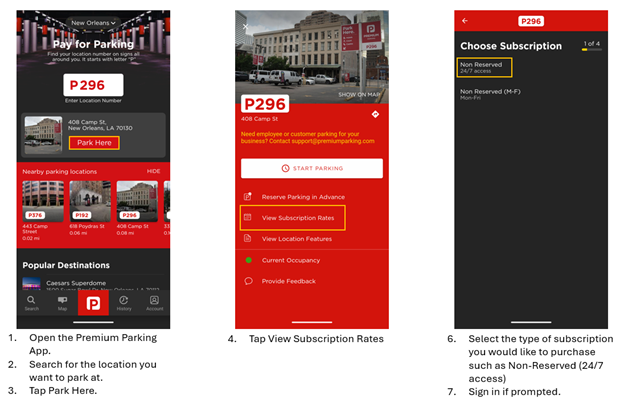
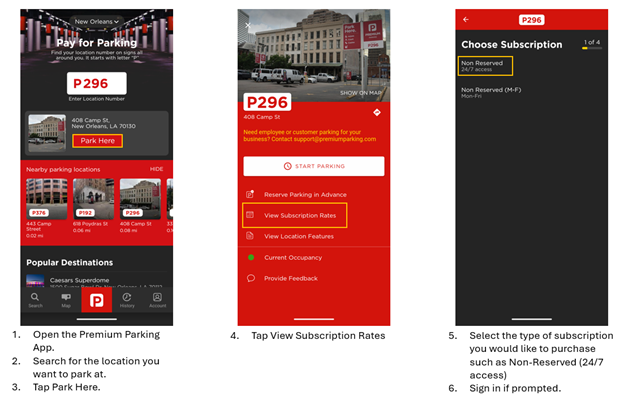
- Open the Premium Parking App.
- Search for the location you want to park at.
- Tap Park Here.
- Tap View Subscription Rates
- Select the type of subscription you would like to purchase such as Non-Reserved (24/7 access)
- Sign in if prompted.
- Select or add your vehicle details and Tap Continue.
- Select or add your payment details and tap Continue.
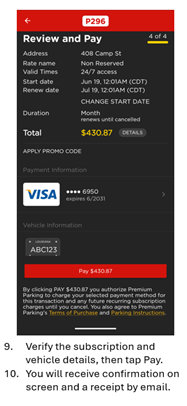
- Verify the subscription and vehicle details, then tap Pay.
- You will receive confirmation on screen and a receipt by email.
How many cars can I add to my subscription?
You may add up to 3 vehicle license plates to your parking subscription.
- If you make a change in vehicles or license plates, make sure to update your license plate to ensure you are valid to park.
- Be careful – Even if your vehicle is listed on your Vehicles list, it may not be attached to your parking subscription. Make sure you attach the vehicle to your subscription so that it may be valid to park.
- Need help making changes to the license plate number on your subscription. Call our Customer Support Team at 1.844.236.2011 for assistance.
How many cars can I park from my subscription?
- You may park only one vehicle on the subscription on the lot at a time at the parking location.
- If you need to park more than one vehicle from your subscription, you must pay for parking for the second vehicle.
- If you need to park more than one vehicle from your subscription regularly, consider purchasing a subscription for each vehicle to avoid compliance issues.
How do I pay for my subscription?
Parking subscriptions can be paid for using:
- Credit Card or Debit Card
- This is the easiest way to pay for your subscription.
- However, by using a credit card or debit card, you agree to pay a 3.5% convenience fee.
- You must ensure your card remains valid and has enough funds for your subscription to renew regularly. If funds are not available, or your card expired or has been canceled, the subscription will lapse and your vehicle will not be valid to park after the subscription expires.
- Electronic Check (Accredited Clearing House/ACH)
- You may enter your bank details (Name on Account, Account Number, Routing Number) to allow direct withdrawals for payments towards your parking subscription.
- Using ACH will not incur any convenience fee.
- You must ensure your bank account has enough funds to pay for the parking subscription. If funds are not available, the subscription will lapse and your vehicle will not be valid to park after the subscription expires.
How does my subscription renew?
Your credit / debit card or bank account will be charged based on the terms of your subscription. If you selected monthly parking, your subscription will be charged monthly on the date or closest date you signed up for the subscription. For example, if you purchased a subscription on March 1, 2025, the renewal would occur on April 1, 2025, then May 1, 2025, etc.
Annual parking passes are charged once per year on the original date of purchase. For example, if you purchased an annual parking pass on March 1, 2025, the renewal would occur on March 1, 2026, and so on.
Renewals will occur regularly until the subscription is canceled, the credit or debit card attached expires, or if the payment method is disconnected manually by the customer.
My credit/debit card expired or was cancelled. Can I still park?
If your credit or debit card expires after your subscription renewed, you can still park until the end date of your subscription. When your subscription expires, your vehicle will not be valid to park afterwards. You may update your card information in your subscription to ensure that it will renew on the expiration date.
If your credit or debit card expires before your subscription renewed, your vehicle will not be valid to park after the subscription expires. You must sign up for a new subscription with a different credit or debit card to remain valid to park.